
Overview
Did you know that Microsoft Intune offers powerful capabilities for managing mobile apps through Intune App Configuration and Protection Policies? These policies are part of Intune’s Mobile Application Management (MAM) features, which allow IT-admins to secure and configure apps without requiring full device management. Intune MAM works alongside Intune MDM (Mobile Device Management), giving organizations flexible options for managing both devices and applications across platforms like Android and Apple.
Intune MDM features device enrollment to be managed by Intune, deploy Operating System (OS) configuration and compliance policies, run script, updates etc. Everything is related to a device being managed by Intune. Different platform OS have their own features how to manage them. Supported OS have build int MDM capabilities.
Intune Mobile Application Management (MAM) for managing applications. MAM features includes deploying, configuring and protecting organization data on apps. Same thing as MDM on different platform OS, these features works differently. On this post, I’ll focus only on Android and Apple Intune MAM and MAM-WE capabilities.
Blog series overview
Guide to Intune App Protection Policies: Part 1 – Overview
Guide to Intune App Protection Policies: Part 2 – Intune MAM
Guide to Intune App Protection Policies: Part 3 – Data Protection Framework with App Protection policies
Managed Apps: The Cornerstone of Intune MAM
Intune Managed apps is actually really simple to understand; Every application deployed with Intune MAM capabilities, is managed app. Every application that is not deployed with Intune, is unmanaged app.
When Intune manages app, we can deliver configurations and protection policies. Different app configurations depends on the app itself, what kind of configuration parameters are available and how to build correct configuration policy for successful deployment. Usually this means reading app developer documentation. Luckily Microsoft apps configuration documentation is found on Microsoft Learn Configure apps using Microsoft Intune. App configuration policies are not always needed or not required. The app developer must incorporate app configuration support into the app to allow app configuration via Intune. I always try to build app configuration policies to predefine something for the end-user, to easy up usage of organization apps on mobile devices. Example, predefining Microsoft Outlook account details, so users just starts using Microsoft Outlook without complex setups. This also helps eliminate setup problems and end-user is happy.
How app configuration are deployed to app varies slightly. For Intune managed devices applications are deployed and configured to either devices or users using Intune MDM. There’s also solution for unmanaged devices, called MAM-Without Enrollment (MAM-WE) where app configuration and protection policies are deployed using Intune MAM capabilities. MAM-WE is most often used as “light” BYOD model, where organization only manages app, configuring and protection app data. If a device is managed with 3rd party MDM solution, MAM-WE can still be used to deliver app configuration and protection policies.
On the picture, when IT-admin selects App configuration on Intune, there’s two choices.
- Managed Devices, Intune deploys App configuration using Intune MDM
- Managed apps, Intune deploys App configuration using Intune MAM
Whenever a app configuration is needed, think carefully what approach you take!

Application deployment principles
When deploying applications, IT-admin has to carefully plan app deployment. I follow simple principles:
- For Managed devices, Intune admin can deploy app to either user or devices as a required or available app.
- Required app will automatically deploy to mobile devices.
- Available app will be available
- These two deployment modes slightly varies based on platform.
- For unmanaged devices, Intune admin can only deploy app as available and only for a user.
- Available App will be available to be installed by the end user
- Where app is available for installation, varies slightly based on platform, but most often app is installed using Web Company portal
- Available App will be available to be installed by the end user
Android Applications
For Android Enterprise, deploying app and app configuration and protection policies is quite simple and effective. Intune admin has couple of options for app deployment methods.
- Managed Google Play, either Public or Private apps. Private apps supports .APK app packages.
- Build-In apps that are prebuild to Intune and fully supports App Protection policies (Intune SDK implemented)
- Android Enterprise system app that enables/disables apps that are already part of the platform.
NOTE! Intune still shows Android Device Admin based application deployments, but they are not supported on Android Enterprise!

Android Store App, Line-of-business app (LOB app)
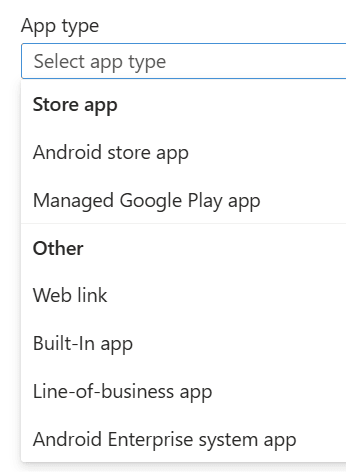
Also little bit different deployment methods for different management models or unmanaged devices.
- Intune enrolled Android Enterprise with work profile, Corporate owned or personally owned
- All apps are deployed to work profile where configuration and protection policies are applied using Intune MDM, during Intune sync when other MDM configurations are applied.
- On Intune, app configuration and protection policies are assigned to users.
- Intune enrolled Android Enterprise Fully Managed
- All apps are deployed to device’s main operating system and appear on the device’s home screen or app drawer like any other app.
- App configuration and protection policies are applied using Intune MDM.
- On Intune, app configuration and protection policies are assigned to users and Assignment filter is heavily used.
- Intune enrolled Android Enterprise Dedicated
- All apps are deployed device’s main operating system and appear on the device’s home screen or app drawer like any other app. Dedicated devices might have Microsoft managed home screen app where the apps appear.
- App configuration and protection policies are applied using Intune MDM.
- On Intune, app configuration and protection policies are assigned to Devices.
- Android without enrolled to Intune MDM or enrolled to 3rd party MDM
- User can use Web Company portal or Company Portal App to install applications, where user is redirected to Google Play Store or use default Google Play Store to install applications.
- App configuration and protection policies are applied using Intune MAM.
- On Intune, App configuration and protection policies are assigned to Users and Assignment filter is heavily used.
Apple iOS/iPadOS Applications
On Apple mobile device platform, Intune admin has lot’s of options to select from. For Apple, Intune supports multiple methods of app deployment.
- Apple Volume Purchase Program based app, where apps are “bought” from Apple Business/School Manager (ABM/ABS) and synched to Intune.
- Apple App Store apps, where App Store is used to deploy app.
- Build-In apps that are prebuild to Intune and fully supports App Protection policies (Intune SDK implemented)
- LOB app where Intune admin can deploy application packages like .IPA file.
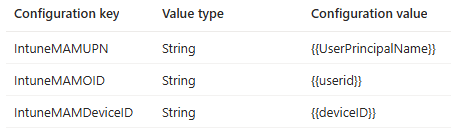
For Apple Intune MDM enrolled device if application is installed from Intune, app configuration policy has to be deployed for every app and every device! This app configuration configures app as a managed app. Some Microsoft apps already implement this configuration, but every 3rd party app does not. If this configuration is not deployed, APP will not fail, but APP designed and deployed to unmanaged devices will be enforced and that gives a little bit headache.
IntuneMAMUPN and IntuneMAMOID must be configured for all MDM managed applications. IntuneMAMDeviceID must be configured for all third-party and line-of-business MDM managed applications. I always configure all keys, as a precaution.
NOTE! App configuration can only be deployed to managed apps! if a user installs app outside of management, from Apple App store, that apps is treated as unmanaged apps! If afterwards same application is deployed from Intune as a required app, Intune will "takeover" this application and might be really confusing for the end user!

- Intune ADE (Automated Device Enrollment) Apple iOS/iPadOS supervised/unsupervised personal device
- All apps are deployed to device’s main operating system and appear on the device’s home screen or app library like any other app.
- App configuration and protection policies are applied using Intune MDM.
- On Intune, app configuration and protection policies are assigned to users and Assignment filter is heavily used.
- Intune Shared device mode mode Apple iOS supervised/unsupervised shared device
- All apps are deployed to device’s main operating system and appear on the device’s home screen or app library like any other app.
- App configuration and protection policies are applied using Intune MDM.
- On Intune, app configuration and protection policies are assigned to devices and Assignment filter is heavily used.
- Available apps are NOT supported
- Intune Shared iPad mode Apple iPadOS supervised/unsupervised shared device
- All apps are deployed to device’s main operating system and appear on the device’s home screen or app library like any other app.
- App configuration and protection policies are applied using Intune MDM, some app configuration can use user assignment.
- On Intune, app configuration and protection policies are assigned to devices and Assignment filter is heavily used.
- Available apps and APP are NOT supported
- Intune device or user enrolled Apple iOS/iPadOS BYOD/personal device
- All apps are deployed to device’s main operating system and appear on the device’s home screen or app library like any other app.
- App configuration and protection policies are applied using Intune MDM.
- On Intune, app configuration and protection policies are assigned to users and Assignment filter is heavily used.
- Apple iOS/iPadOS without enrolled to Intune MDM or enrolled to 3rd party MDM
- User can use Web Company portal or Company Portal App to install applications or use default Google Play Store to install applications. LOB apps are most often available only on Company portal.
- App configuration and protection policies are applied using Intune MAM.
- On Intune, App configuration and protection policies are assigned to users and Assignment filter is heavily used.
Conclusion
Understanding the difference between Intune MDM and Intune MAM is essential for effective mobile device and application management. While MDM focuses on managing the entire device, MAM allows IT-admins to secure and configure apps without requiring device enrollment – ideal for BYOD scenarios. Whether you’re deploying apps to Android or Apple platforms, choosing the right management model (MDM vs. MAM/MAM-WE) and deployment method ensures a smoother user experience and better data protection. Always plan your app deployment strategy carefully, considering platform-specific capabilities, user needs, and organizational policies.
Next: My take on App protection policy data framework policy. How to implement and my sample policies!